

Blog
Rental buildings: protect access to your EV chargers with FLO, Wallbox and SMP+ locking features

October 19, 2026

4 minutes
In a rental building with an electric vehicle energy management system (EVEMS), each charger is assigned to a resident, and every kilowatt-hour is billed to that resident. If a neighbour or visitor plugs into a charger that isn’t theirs, the cost split is no longer accurate and the building’s load management is disrupted.
There are two ways to control access. Residents can lock their own charger, and the property manager can control every charger in the building through SMP+ and its locking feature, which is accessible via the Connect premium platform.
Why lock chargers in a shared parking area?
In a shared parking area, a charger that isn’t locked can be used by anyone. RVE’s SMP+ measures each charger’s consumption and enables automated billing for each user. Without locking, a resident could end up paying for electricity used by someone else’s vehicle.
Locking chargers helps:
- protect each resident from charges that aren’t theirs;
- keep load management in the building balanced;
- split energy costs fairly and transparently.
Locked by the resident
FLO and Wallbox chargers both have a locking feature in their mobile app. Residents can use it to stop anyone else, such as a visitor, from using their charger.
Wallbox Pulsar Plus: Auto-lock
The Wallbox app interface offers a simple option for securing access to the charging station:

Open the Wallbox app on your phone.

Select the device (Pulsar Plus) and make sure the charging station is connected to your phone via Bluetooth.

Click the padlock icon in the upper-right corner of the screen.

Enable Auto-Lock to prevent unauthorized charging.
To start a charging session, follow the same steps and turn Auto-lock off. Locking works even without a Wi-Fi connection.
Important: the charger must stay unlocked for the whole session so that charging can continue during EVEMS load management events.


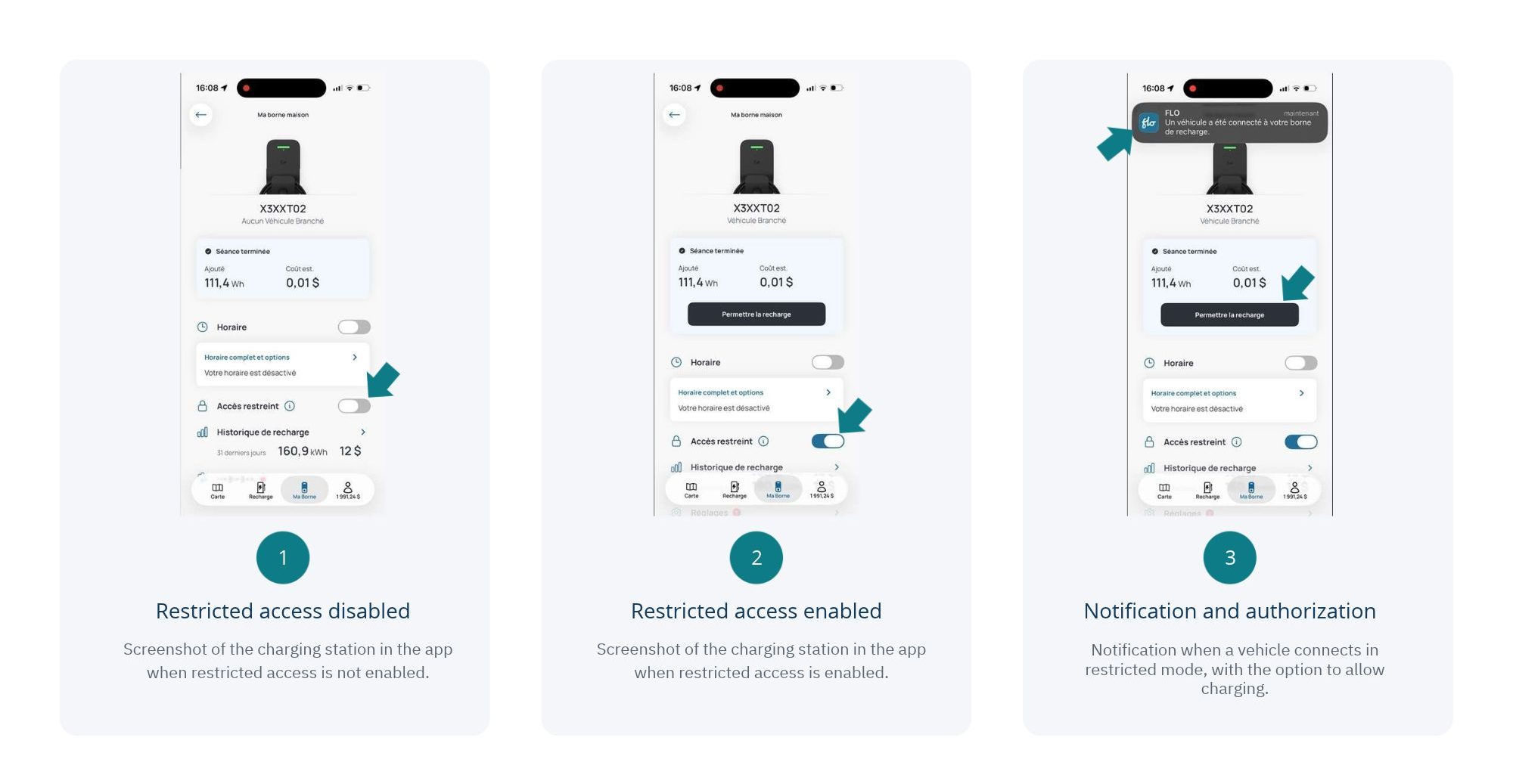
FLO chargers: restricted access
Open the FLO app and select your charger.
Turn on Restricted access.
When a vehicle plugs into the charger, you receive a notification.
Tap Allow charging to authorize the session.
No charging session starts without your approval, so you stay in control even when you’re away.
Locked by the administrator
RVE’s SMP+ adds central control. From the Connect platform (premium plan), the property manager can lock or unlock any charger in the building remotely, in just a few clicks.
Only the manager can use this feature. A resident who wants their charger locked or unlocked sends a request to the manager.
Central control is especially useful to:
- turn off a charger assigned to a vacant unit;
- handle tenant move-ins and move-outs;
- suspend access when a charging account is unpaid;
- respond quickly when unauthorized use is detected.
Our recommendation
If you offer EV charging to your tenants, tell them about their charger’s locking options when they move in. To make access, consumption tracking and billing easier to manage, choose RVE’s SMP+ and its Connect platform.
Stay connected
Stay up to date on industry news and don’t miss any posts from the RVE blog by signing up for our newsletter! Personalized, relevant content, delivered straight to your inbox.
Product mentioned in this article

